CNC machine monitoring and production tracking software for job shops in Gujarat
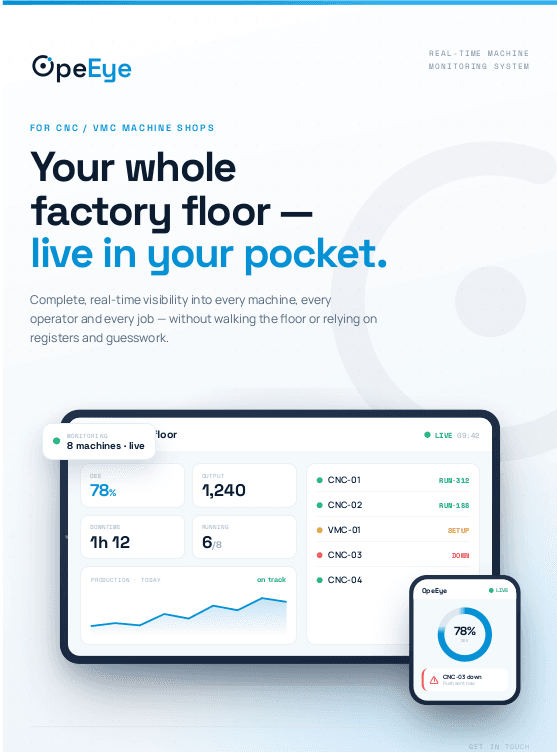
OpeEye shows a factory owner every machine live on one screen — running, setup, idle or down — with pieces against target, downtime with its reason, OEE, tool life and cost per piece, plus shift reports written by nobody. It starts with an Android tablet at each machine, no wiring, live in one afternoon; an auto-count box or a Fanuc, Haas or Mitsubishi controller connection can be added later. ₹399 per machine per month, free 15-day trial, built in Rajkot.
127/200
14m 32s
setup · 25 min planned
32m
spindle noise
no job
assigned
Sound familiar?
- /01
Walk the floor to know what's running
Open your phone — every machine, live
- /02
Hear about a breakdown hours later
Alert on your phone in seconds
- /03
Learn at month-end which job lost money
Cost per piece while the job runs
- /04
Tool life lives in the operator's memory
Tool life measured on your floor
- /05
Registers, diaries and phone calls
One screen. Zero paperwork.
Everything your floor does,made visible.
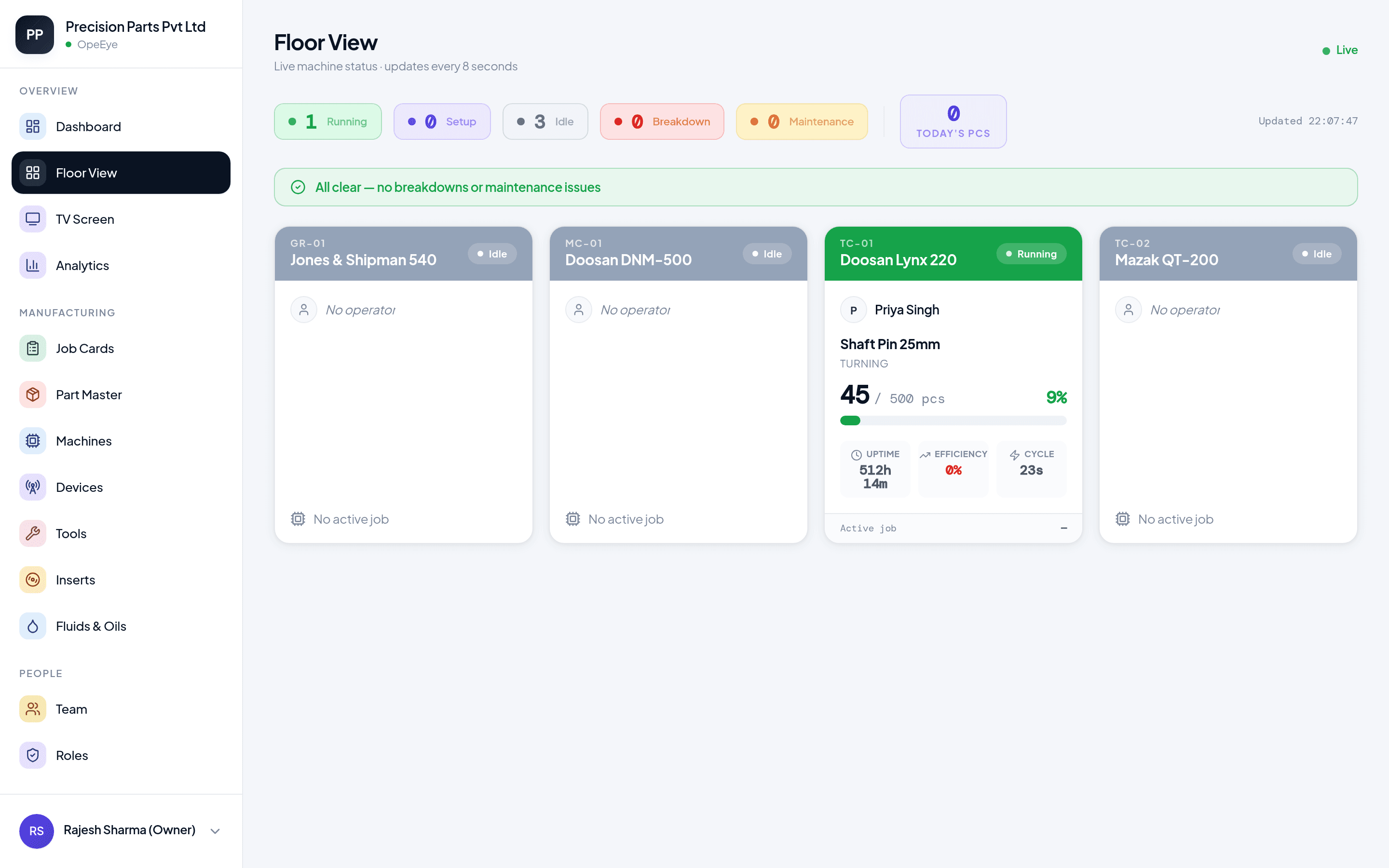
See every machine,right now.
Your whole floor on one screen, refreshing live.
- Running, setup, idle or down — at a glance
- Phone, laptop or a TV on the shop wall
- From home, travel or a customer's office
Data enters at the machine —in three taps.
A tablet on every machine. PIN login, big buttons.
- Pieces, rejects, tool changes, breakdowns
- Seconds per entry, no typing
- If they can use WhatsApp, they can use this
Suresh · CNC-02
JOB #B-118 · FLANGE 80MM
86/150
PIECES THIS SHIFT
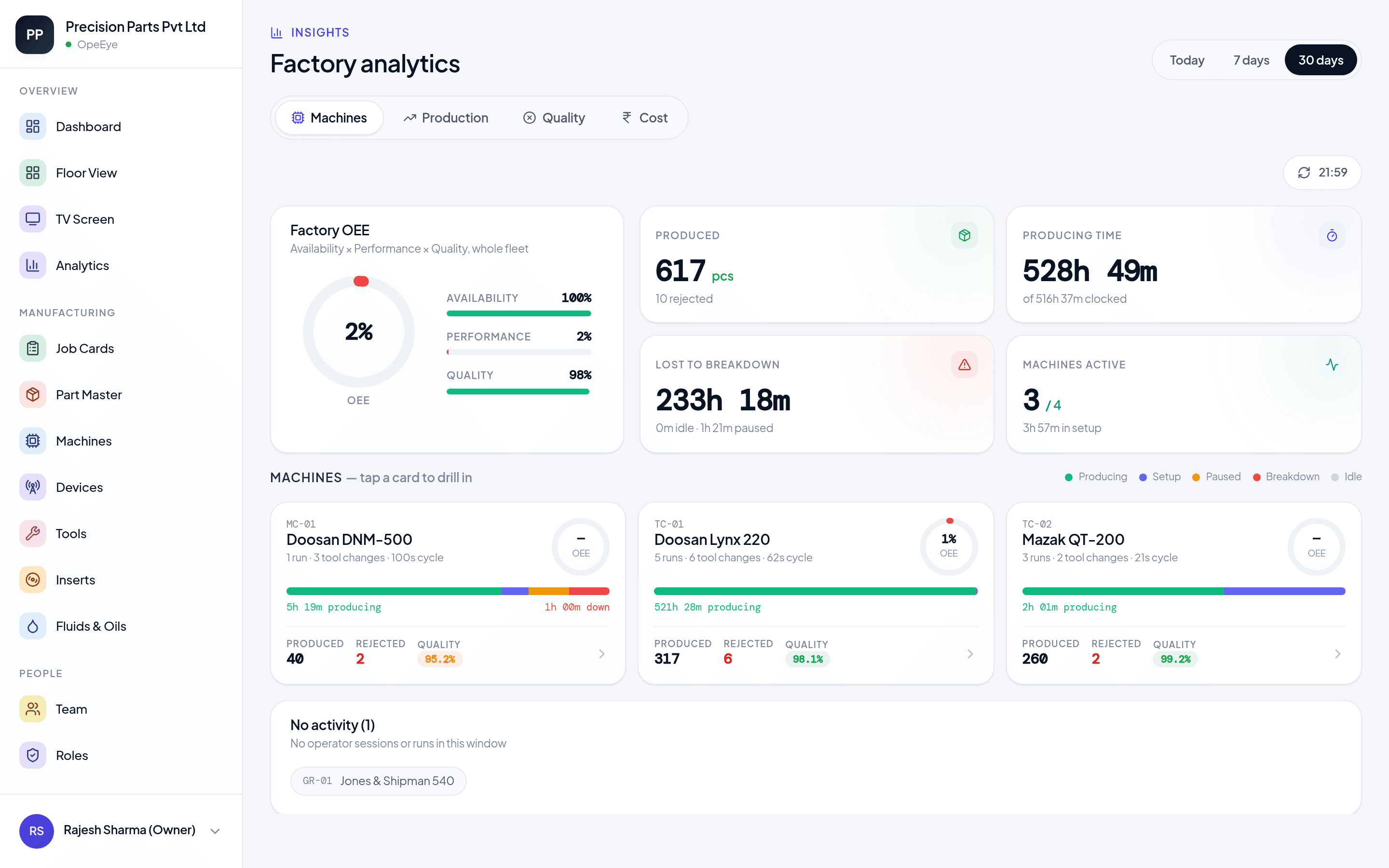
Your real output —not the diary version.
Every number computed from what actually happened on the floor.
- Daily production and shift comparisons
- OEE per machine and per job
- Expected vs. actual pieces, live
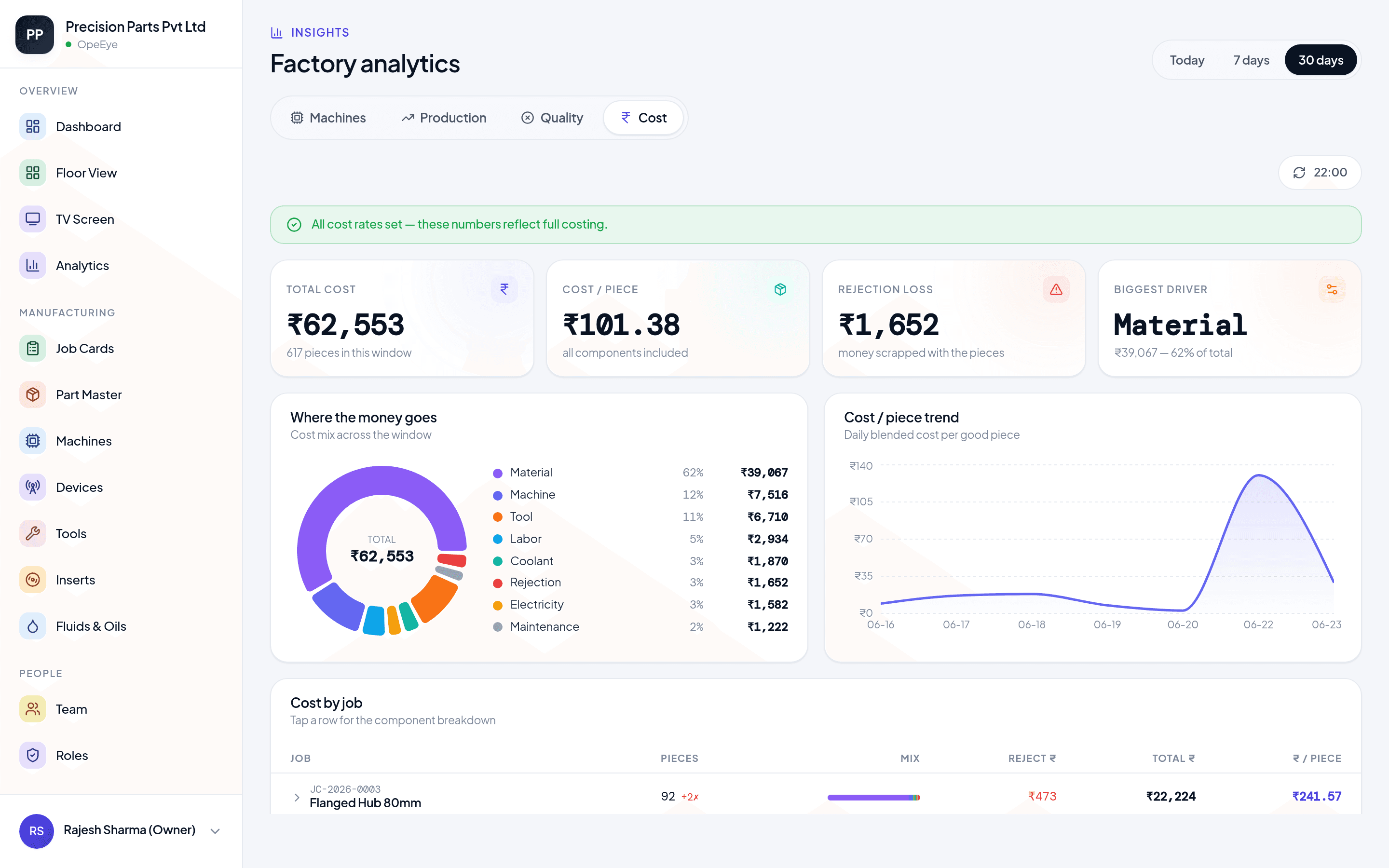
The real cost ofevery piece.
Measured from your floor — not estimated.
- Machine time, tooling, rejection loss
- Cost per piece, per job, trending
- See exactly where money leaks
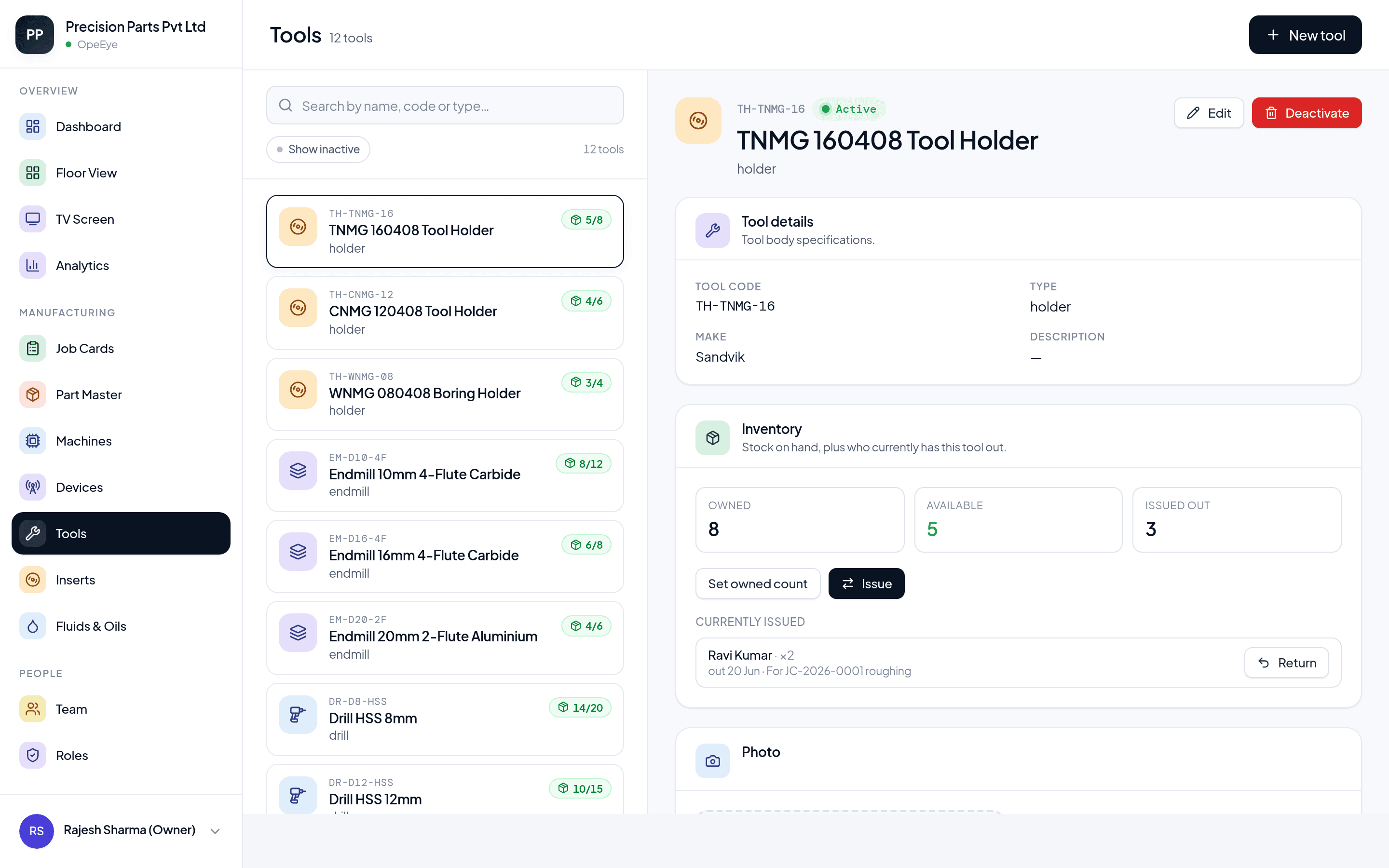
Tool life measured.Downtime caught live.
The insert catalogue says 400 pieces. Your floor says 280.
- Real tool life, per insert
- Breakdowns reported the moment they happen
- Every stoppage with its root cause
The small things?Also covered.
Breakdown alerts
A machine goes down — your phone knows in seconds, with the reason attached.
Rejection reasons
Every reject logged with a cause, so patterns show up.
Works offline
Internet down? Tablets keep logging and sync later.
Job timelines
Each job's full story: setups, pauses, pieces, breakdowns.
Wall-TV mode
The whole floor on a screen everyone can see.
Shift reports
Every shift summarized — output, downtime, efficiency. Ready before the next one starts.
Nothing to wireon day one.
A tablet next to each machine is the whole setup on day one — no downtime to install, no changes to your machines. Add auto-count sensors or connect your CNC controllers later, machine by machine, when you want the counting to be hands-free.
0
changes to your machines
any
machine, brand or age
8s
between screen updates
1 day
to get fully running
Most manufacturers run at around 60% OEE, and more sit below 45% than above the 85% that counts as world-class (OEE.com). OpeEye computes yours from every logged stop, piece and reject — refreshed every 8 seconds, from the first shift.
Who is it for? One floor, three ways to see it.
For the owner
Run the shop from anywhere
- Live floor on your phone — home, travel, customer visits
- True cost per piece and where money leaks
- Shift reports and OEE without asking anyone
How does it work? Three steps, zero wiring.
01
Mount tablets
Any Android tablet on each machine. Operators sign in with a 4-digit PIN.
02
Operators tap
Pieces, rejections, tool changes, breakdowns — logged in seconds at the machine.
03
You see it all
Phone, laptop, wall TV — your whole floor live, from anywhere.
How do the numbers get in? Manual today, Automatic when you want.
Every machine starts on Manual: operators tap on a tablet. When you want a machine to count by itself, switch it to Automatic — with a small box, or straight from the CNC control. Same price, same dashboard, same reports. Mix both on one floor.
Operator tablet
A basic Android tablet at each machine. Operators log in with a PIN and tap: pieces, rejects, tool changes, breakdowns. Works on any machine of any age — CNC, VMC, conventional. Nothing fitted to the machine.
- Pieces & rejects, with reasons
- Who ran which job
- Every stoppage, with its cause
Auto-count box
A small box fitted inside the machine panel, connected to the machine's signal (tower) lamp. It counts every piece and knows when the machine is running or standing — by itself. The tablet stays for rejects, reasons and jobs.
- Piece count without tapping
- Running or standing, live
- Cycle time from the machine
Controller connection
For newer CNCs — Fanuc, Haas, Mitsubishi first — OpeEye reads the count, alarms and cycle time straight from the machine's own control over your factory network. Read-only: nothing on the machine changes. Rolling out.
- Machine alarms, with the code
- Exact cycle time
- Which program is running
What does Industry 4.0 mean for a job shop?
Not robots, not a new ERP. For a 5–50 machine shop, Industry 4.0 is every machine — old or new — reporting whether it is running, idle or down and why, so decisions come from live numbers instead of registers. That is what OpeEye does, from ₹399 per machine a month, with no new machines and no wiring to start.
- 1. ConnectTablet, auto-count box or CNC controller — any machine, any age.
- 2. MeasureOEE, downtime by reason, rejects by cause, cost per piece — computed, not guessed.
- 3. ActBreakdown alerts in seconds; shift and daily reports that write themselves.
Industry 4.0 for MSME machine shops Government programme: SAMARTH Udyog Bharat 4.0
OEE — share of planned time making good parts
On a 10-machine floor, every 10 points of OEE is as much good output as one more machine running flat out — without buying it.
Benchmarks: OEE.com. You can't win the points you don't measure — connecting the machines is the first step.
What does it cost? One price per machine. Nothing per user.
₹399 per machine per month — Manual or Automatic, all features, unlimited users. Automatic adds only a one-time box per machine. Mix them on one floor.
Manual
Operators tap on a tablet at each machine.
₹399per machine / month
- Live floor board — phone, laptop, wall TV
- Pieces vs target per machine, operator, shift, job
- Rejects and downtime with reasons; breakdown alerts
- OEE per machine and per job
- Job costing, tool life, coolant tracking
- Automatic shift and daily production reports
- Unlimited users · works offline
Any machine, any age. Tablets bought locally — nothing to buy from us.
Automatic
The machine counts by itself. Tablet stays for rejects and reasons.
₹399per machine / month + a one-time auto-count box (price in the demo)
- Everything in Manual — same software price
- Piece count and running/standing time from a small box, fitted by us
- Or straight from the CNC control (Fanuc, Haas, Mitsubishi — rolling out): alarms, exact cycle times
- Tablet stays for rejects, reasons and jobs
Mix with Manual machine by machine — one floor, one bill.
Both plans: no per-user fees · no setup fee · no contract · free 15-day trial · on-site setup across Gujarat
10 machines = ₹3,990/month — less than one operator's salary.
More than 15 machines? Volume pricing — ask us. See full pricing details
Fair questions.
The ones every shop owner asks us before the demo.
Answered by Dev Hadvani, founder · Updated
OpeEye is machine monitoring and production tracking software for CNC and VMC machine shops. It shows every machine, operator and job live on one screen — pieces vs target, downtime with reasons, OEE, tool life and job cost — with automatic shift and daily production reports. Built in Rajkot, Gujarat.
Plain answers to the questions you actually ask.
Built in Rajkot. On-site across Gujarat.
Elsewhere in India: remote setup, same software.
Take it to your team.
One PDF. Everything OpeEye does, ready to share.
No signup · Instant download